CQ Ferret Tutorial: Turning Competency Questions into Project Intelligence

BLUF
CQ Ferret helps ontology and knowledge-graph teams move competency questions out of Word, PowerPoint, and one-off spreadsheets and into a structured browser workspace. The payoff is practical: you can gather the question, its decomposition, contributors, data sources, diagrams, and SQL/SPARQL query ideas in one place; export normalized CSV or JSON-LD; rebuild vocabulary candidates; and load the resulting graph into downstream tooling.
This tutorial focuses only on two static pages:
- CQ Ferret: the competency-question workspace.
- Extracted Vocabulary: the vocabulary review and export page.
For those who would like to fork and deploy this app in their own environment, these pages run as static web pages, use JavaScript from docs/app, and store their working data locally in the user's browser (via IndexedDB). CQ Ferret's native data model is aligned with BFO, Common Core Ontologies, and the small knowledge-engineering artifact ontology shipped with this project. By design, it does not store user's data on the web, in order to keep data secure and reduce overhead costs for projects. The static site is also deployable locally or on a server with Node.
Table of Contents
- The Problem CQ Ferret Solves
- Worked Scenario
- Open the App
- Create or Import Competency Questions
- Add Contributors and Roles
- Decompose the Question
- Attach Data Sources and Data Quality Notes
- Attach Mermaid Diagrams
- Attach SQL or SPARQL Query Ideas
- Rebuild and Export Vocabulary
- Export JSON-LD and Query the Graph
- Design Pattern Notes
- Screenshot Checklist
- Frequently Asked Questions
The Problem CQ Ferret Solves
In ontology-development projects, competency questions often start as meeting notes, tables, slides, or ad hoc requirements text. That is useful for early discussion, but the project soon needs more than a sentence. The team needs to know:
- Who asked or approved the question?
- What role does that person play?
- What datasets, data fields, systems, or information sources are needed to answer it?
- What data quality issues or provenance concerns are already known?
- Which AS-IS or TO-BE business-process diagrams, entity-relation diagrams, semantic design patterns, SQL queries, SPARQL queries, or NoSQL query ideas support it?
- Which vocabulary terms are implied by the wording of the questions?
Word and PowerPoint make this information readable, but hard to query. Excel can make it tabular, but each project tends to invent its own sheet structure. CQ Ferret gives the team a browser form that normalizes the inputs and makes the data exportable.
Design note: A competency question is not merely a sentence in a document. In the application ontology used here, a competency question is an interrogative information content entity: a question-like content item used to evaluate whether a model, vocabulary, data system, or query capability has enough coverage to answer something that matters.
Worked Scenario
This tutorial uses a fleet maintenance and service-readiness scenario. It is intentionally ordinary: many industries need to integrate data across maintenance systems, ERP systems, telematics, procurement systems, asset registers, and work-order platforms.
The use-case data is about vehicles, work orders, parts, depots, vendors, mileage, and downtime. The CQ Ferret data is about the project work: competency questions, contributors, data sources, diagrams, query notes, and extracted vocabulary.
The running question is:
Which vehicles are at risk of missing scheduled service because required parts are unavailable at their assigned depot?
That question can be asked by a logistics planner, reviewed by a data steward, modeled by an ontologist, supported by a database engineer, and validated by subject matter experts.
Open the App
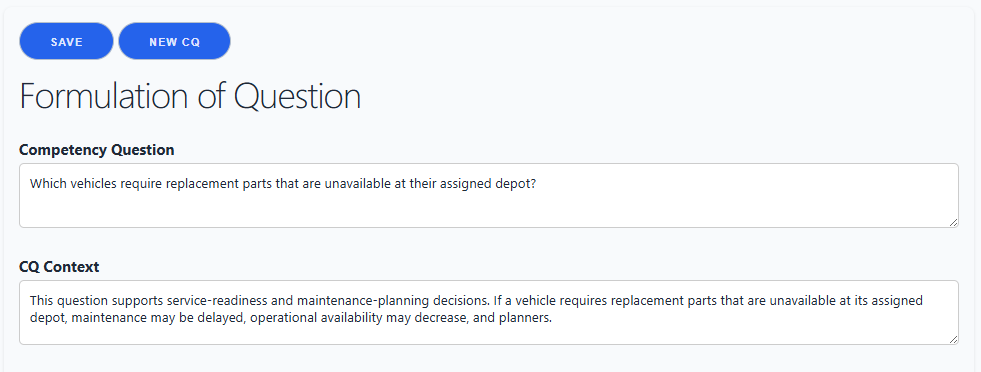
Open CQ Ferret in a browser. The app runs locally as a static page. Data is saved in your browser's IndexedDB database named CQDatabase, in the object store CQStore.
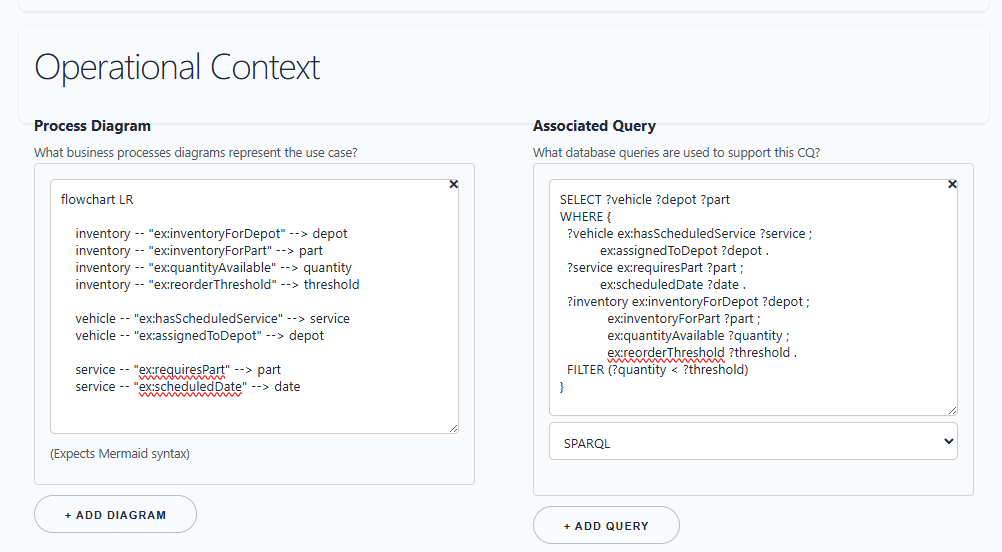
The operational context section can hold supporting technical artifacts for the CQ, including Mermaid syntax and notional SQL or SPARQL query text.
Add Contributors and Roles
In the CQ Contributors section, add people who created, reviewed, approved, or need to validate the question. Record a contact method and notes about their responsibility.
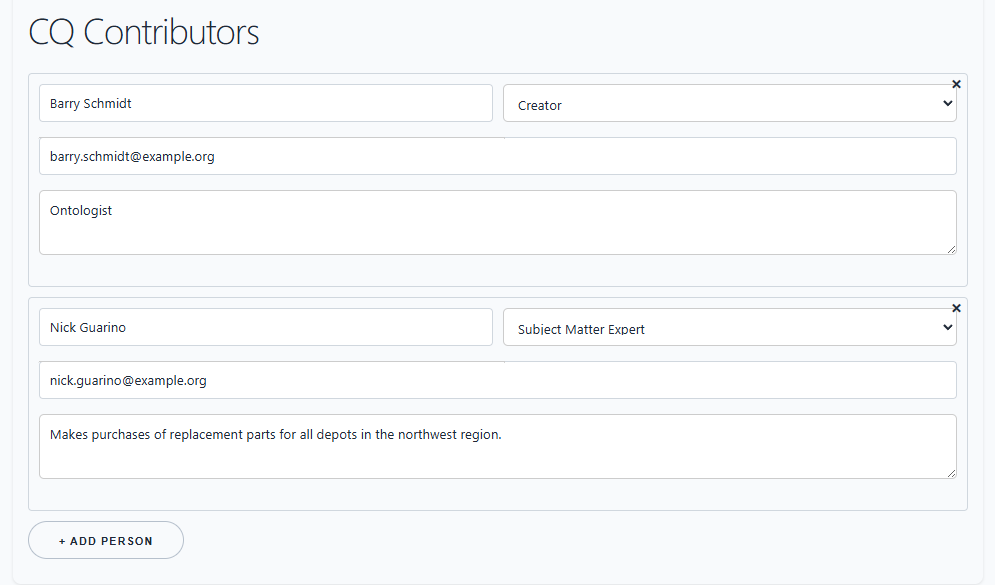
For the worked scenario:
- The fleet operations planner is the subject matter expert.
- The data steward identifies authoritative systems and data quality issues.
- The ontology engineer checks the model coverage.
- The database engineer drafts query patterns.
This matters because the CQ is not just a requirement. It becomes a coordination point for several roles in the development cycle.
Decompose the Question
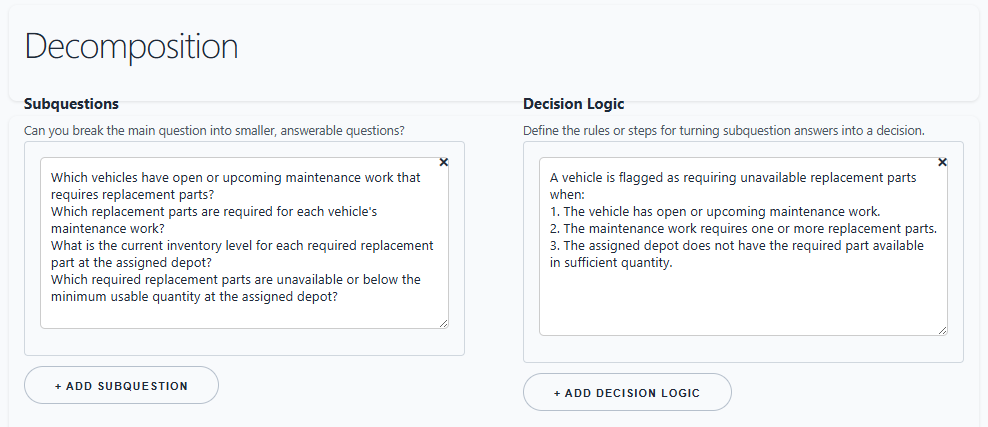
Use the Decomposition section to break the main question into smaller answerable questions.
For the fleet maintenance scenario:
- Which vehicles have scheduled service due within the planning window?
- Which parts are required for the scheduled service type?
- Which depots are assigned to those vehicles?
- Which required parts are unavailable at those depots?
- Which vehicles have no substitute depot or vendor within the delivery threshold?
Decision logic can then capture how the answers combine:
A vehicle is at service-risk when service is due within 14 days, at least one required part is below reorder threshold at the assigned depot, and no alternate source can deliver before the service date.
Attach Data Sources and Data Quality Notes
Use What data sources are relevant to finding the answer? to list systems, datasets, files, or data products needed to answer the CQ.
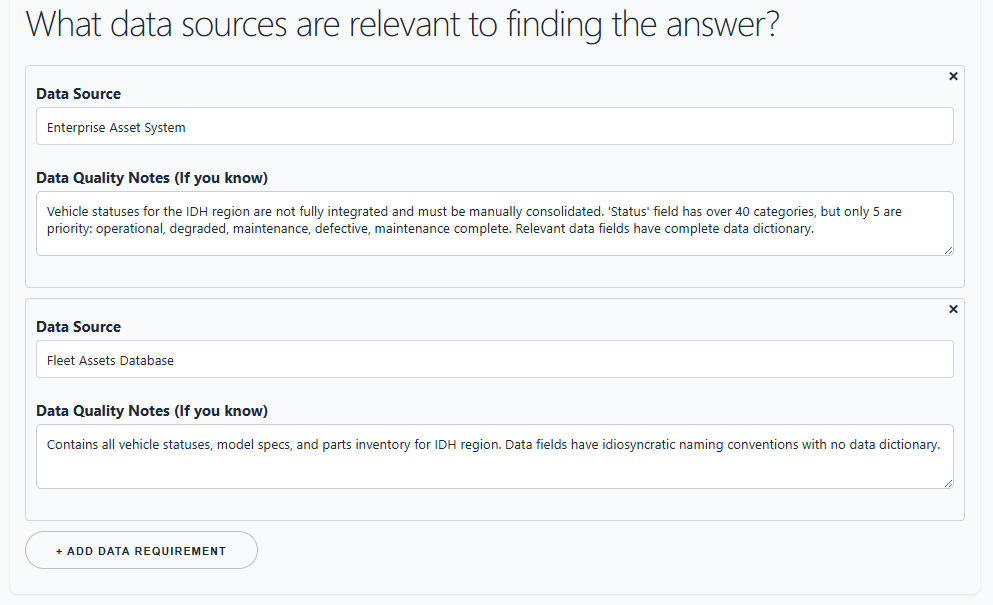
Examples:
- Fleet Maintenance CMMS
- ERP Parts Inventory
- Telematics Mileage Feed
- Depot Assignment Register
- Procurement Vendor Lead-Time Table
Add data quality notes while the context is fresh. These notes are often where the real project risk appears: stale mileage, missing depot assignments, part-number mismatches, duplicate vendor records, or uncertain provenance.
This is the developer's obvious concern: it is not enough to collect the question. The team needs to know whether the data needed to answer it is actually present, trusted, timely, and joinable across systems.
Attach Mermaid Diagrams
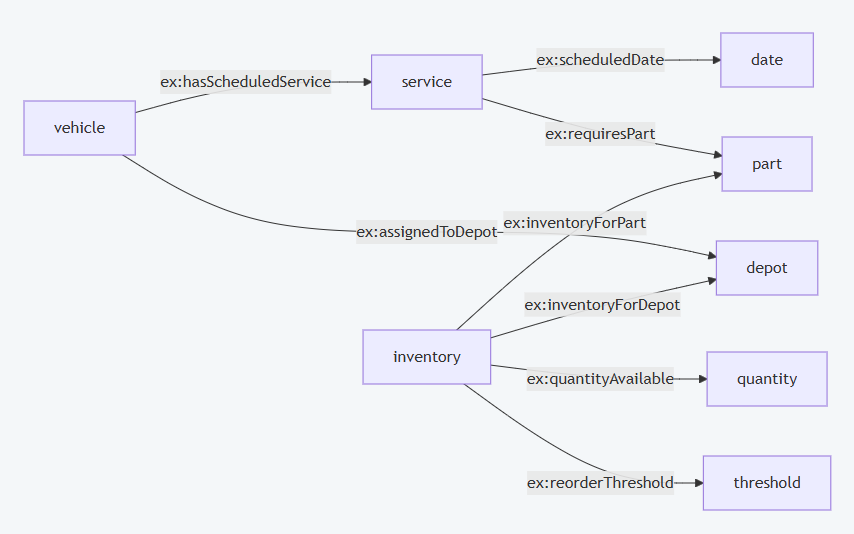
Use the Mermaid diagram area to associate a visual model with the CQ. This can be an AS-IS process, a TO-BE process, a database entity-relationship sketch, or a semantic design pattern.
Example Mermaid text:
flowchart LR
    Vehicle --> ServiceSchedule
    ServiceSchedule --> RequiredPart
    RequiredPart --> DepotInventory
    Vehicle --> AssignedDepot
    AssignedDepot --> DepotInventory
    DepotInventory --> ServiceRiskAssessment
This allows the diagramming work to stay attached to the question it is meant to support. A developer can draft the diagram, a domain expert can validate it, and an ontologist can use it as evidence for model coverage.
The rendered Mermaid view gives reviewers a fast way to inspect the diagram implied by the text captured in the operational context section.
Attach SQL or SPARQL Query Ideas
Use the query area to associate known, notional, or partial query logic with the CQ. The query does not have to be final. It can be a hypothesis about how the information-retrieval process might work.
Example SQL sketch:
SELECT vehicle_id, depot_id, part_id
FROM service_due_view
JOIN service_parts USING (service_type)
JOIN depot_inventory USING (depot_id, part_id)
WHERE service_due_date <= CURRENT_DATE + INTERVAL '14 days'
  AND quantity_available < reorder_threshold;
Example SPARQL sketch:
SELECT ?vehicle ?depot ?part
WHERE {
  ?vehicle ex:hasScheduledService ?service ;
           ex:assignedToDepot ?depot .
  ?service ex:requiresPart ?part ;
           ex:scheduledDate ?date .
  ?inventory ex:inventoryForDepot ?depot ;
             ex:inventoryForPart ?part ;
             ex:quantityAvailable ?quantity ;
             ex:reorderThreshold ?threshold .
  FILTER (?quantity < ?threshold)
}
Rebuild and Export Vocabulary
Open Extracted Vocabulary after you have CQ data in the browser. Choose Rebuild from CQ graph. The vocabulary page reads the CQ graph from IndexedDB, extracts key terms from text-bearing fields, and displays an editable table.
The vocabulary table supports:
irilabeltypedefinitionis ais defined by
You can edit candidate terms, add definitions, classify them as OWL classes or properties, and export the visible table as CSV. The sample vocabulary export in this folder is:
src/tutorials/sample-vocabulary-export.csv
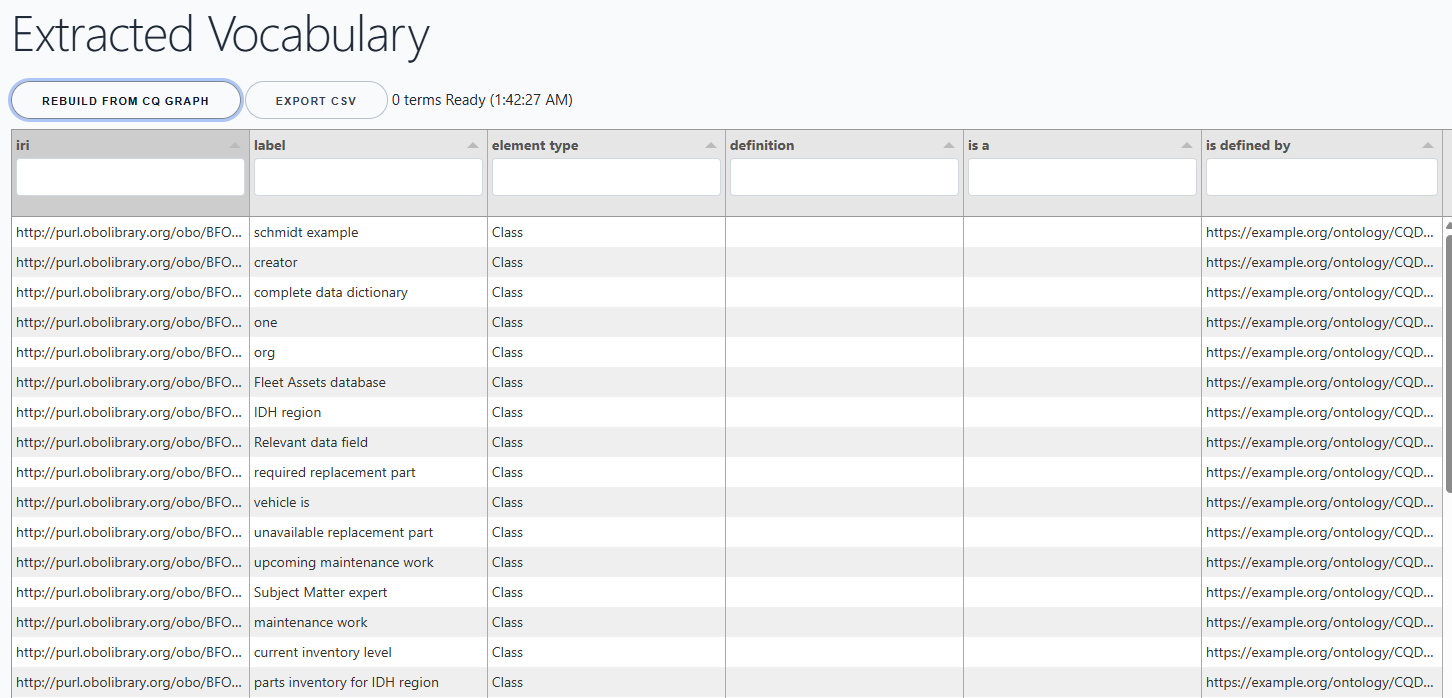
This gives vocabulary stewards a bridge from CQ wording to controlled vocabulary work. It also gives downstream tools a normalized CSV that can be used in the next stage of the ontology-development cycle.
Export JSON-LD and Query the Graph
On CQ Ferret, choose Download JSON-LD to export the current CQ graph. The JSON-LD export can be loaded into an RDF graph database or graph-processing tool.
Once the graph is loaded, SPARQL can answer project-status questions, such as:
- What datasets have been identified across all CQs?
- Which competency questions rely on a given dataset?
- Across all CQs, who are the users of a given dataset?
- Which CQs are supported by at least one Mermaid diagram and at least one SPARQL query?
Example query: all datasets or data sources identified across all CQs.
PREFIX rdf: <http://www.w3.org/1999/02/22-rdf-syntax-ns#>
PREFIX rdfs: <http://www.w3.org/2000/01/rdf-schema#>
PREFIX dcterms: <http://purl.org/dc/terms/>
PREFIX cco: <https://www.commoncoreontologies.org/>
PREFIX okea: <https://github.com/jonathanvajda/okea/>

SELECT DISTINCT ?cq ?cqLabel ?dataset ?datasetLabel ?qualityNote
WHERE {
  ?cq rdf:type okea:ont000002 ;
      rdfs:label ?cqLabel ;
      dcterms:requires ?dataset .

  ?dataset rdf:type cco:ont00000756 ;
           cco:ont00001761 ?datasetLabel .

  OPTIONAL { ?dataset rdfs:comment ?qualityNote . }
}
ORDER BY ?datasetLabel ?cqLabel
Design Pattern Notes
BFO is published as ISO/IEC 21838-2:2021 by ISO, where it is described as a top-level ontology supporting information interchange among heterogeneous information systems: https://www.iso.org/standard/74572.html.
The University at Buffalo also reports that BFO and CCO were adopted as baseline standards for formal ontology work in the U.S. Department of Defense and Intelligence Community: https://www.buffalo.edu/cas/philosophy/news-events/news/smith-top-level-ontologies.html.
CQ Ferret follows that spirit at the application level: it treats questions, diagrams, queries, contributors, roles, data sources, and extracted vocabulary items as typed information artifacts that can be exported and queried.
flowchart TD
    CQ["Competency Question<br/>okea:ont000002"] -->|rdfs:label| CQText["Question text"]
    CQ -->|dcterms:description| Context["CQ context"]
    CQ -->|dcterms:contributor| Person["Contributor<br/>cco:ont00001262"]
    Person -->|BFO:has role| Role["Project role<br/>BFO_0000023"]
    Person -->|cco:designated by| Email["Contact information"]

    CQ -->|BFO:has continuant part| Subquestion["Subquestion<br/>okea:ont000001"]
    CQ -->|BFO:has continuant part| DecisionLogic["Decision logic / business rule<br/>okea:ont000009"]
    CQ -->|dcterms:requires| DataSource["Data source<br/>cco:ont00000756"]
    DataSource -->|rdfs:comment| DataQuality["Data quality note"]

    CQ -->|okea:has mermaid diagram| Diagram["Mermaid diagram<br/>okea:ont000004"]
    Diagram -->|okea:has mermaid text value| MermaidText["Mermaid syntax text"]

    CQ -->|okea:has formalization| Query["Database query<br/>okea:ont000016"]
    Query -->|okea:has query text value| QueryText["SQL / SPARQL / other query text"]

    CQ -->|vocabulary extraction| Vocab["Vocabulary candidate"]
    Vocab -->|rdfs:label| VocabLabel["Term label"]
    Vocab -->|skos:definition| Definition["Definition"]
The important pattern is simple: every CQ becomes a small hub. Around it, the team attaches the evidence needed to decide whether the model and data environment can answer the question.
Frequently Asked Questions
Why use competency questions instead of just collecting terms?
Terms without questions are hard to prioritize. A competency question explains why a term matters by connecting it to an information need, a decision, a data source, or a query.
Is CQ Ferret a replacement for ontology editing tools?
No. It is a requirements and knowledge-engineering capture tool. It helps organize the questions, supporting data, diagrams, query ideas, and vocabulary candidates that later inform ontology editing.
Can multiple people work from the same CQ set?
Yes, by exchanging normalized CSV or JSON-LD exports. CQ Ferret itself is local-browser based, so teams should agree on a project file exchange pattern or repository workflow.
What should I do when the extracted vocabulary has weak or noisy terms?
Treat extraction as a starting point, not an authority. Review labels, remove noise, add definitions, assign OWL element types, and export only the terms that are useful for the next modeling step.
What is the difference between CQ data and use-case data?
CQ data is project metadata: questions, contributors, diagrams, query text, data source references, and vocabulary candidates. Use-case data is the operational domain data, such as vehicles, patients, products, orders, facilities, parts, or work orders.
Why use a browser app with IndexedDB?
It keeps the workflow lightweight. A project team can collect structured data in a static website without standing up a server. Exports can then move the data into other systems.
Why export JSON-LD?
JSON-LD preserves graph structure. After export, the CQ graph can be loaded into a graph database and queried with SPARQL to find gaps, overlaps, dependencies, and evidence across many CQs.
Why export CSV?
CSV is easy to inspect, move, and normalize. It is useful for review, issue tracking, spreadsheet workflows, and import into tools that expect tabular vocabulary or requirements data.
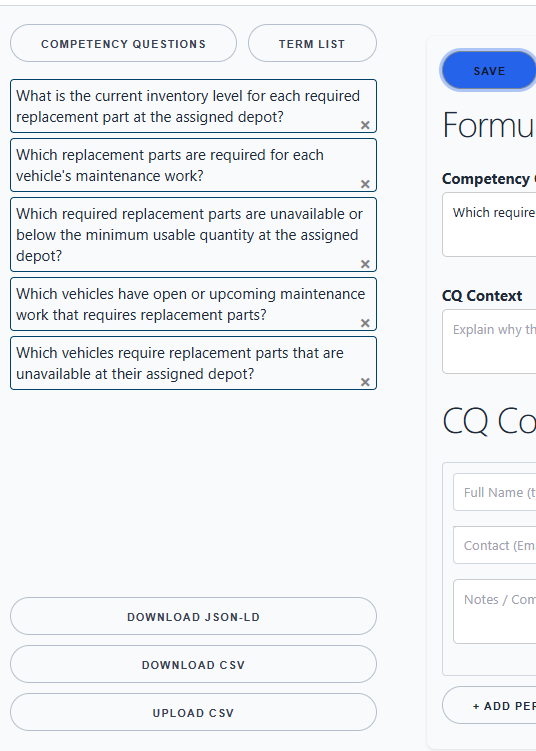
The page has a left panel for the list of CQs and import/export actions. The main panel has the editing form for the selected question.
Import Competency Questions
You can start in either direction:
- Create a new CQ manually in the form.
- Import a normalized CSV file.
- Import JSON-LD if your workflow has already generated graph data.
For a hands-on start, use the sample CSV in this folder:
src/tutorials/sample-cq-ferret-import.csv
On CQ Ferret, choose Upload CSV and select that file. The app will add new records or update matching records if the IDs already exist.
The normalized CQ CSV is row-oriented. A CQ appears once as a row group identified by cq_id. Each associated artifact is a typed row using item_type, such as Contributor, Subquestion, DecisionLogic, DataSource, MermaidDiagram, or DatabaseQuery.